7 Production Systems

Built to solve
real operational failures.

Not demos. Not concepts. Each system below runs in production, was commissioned to eliminate a specific process failure, and has a measurable outcome attached to it.

System 01 of 07
Internal Operational Infrastructure

AI Command
Center

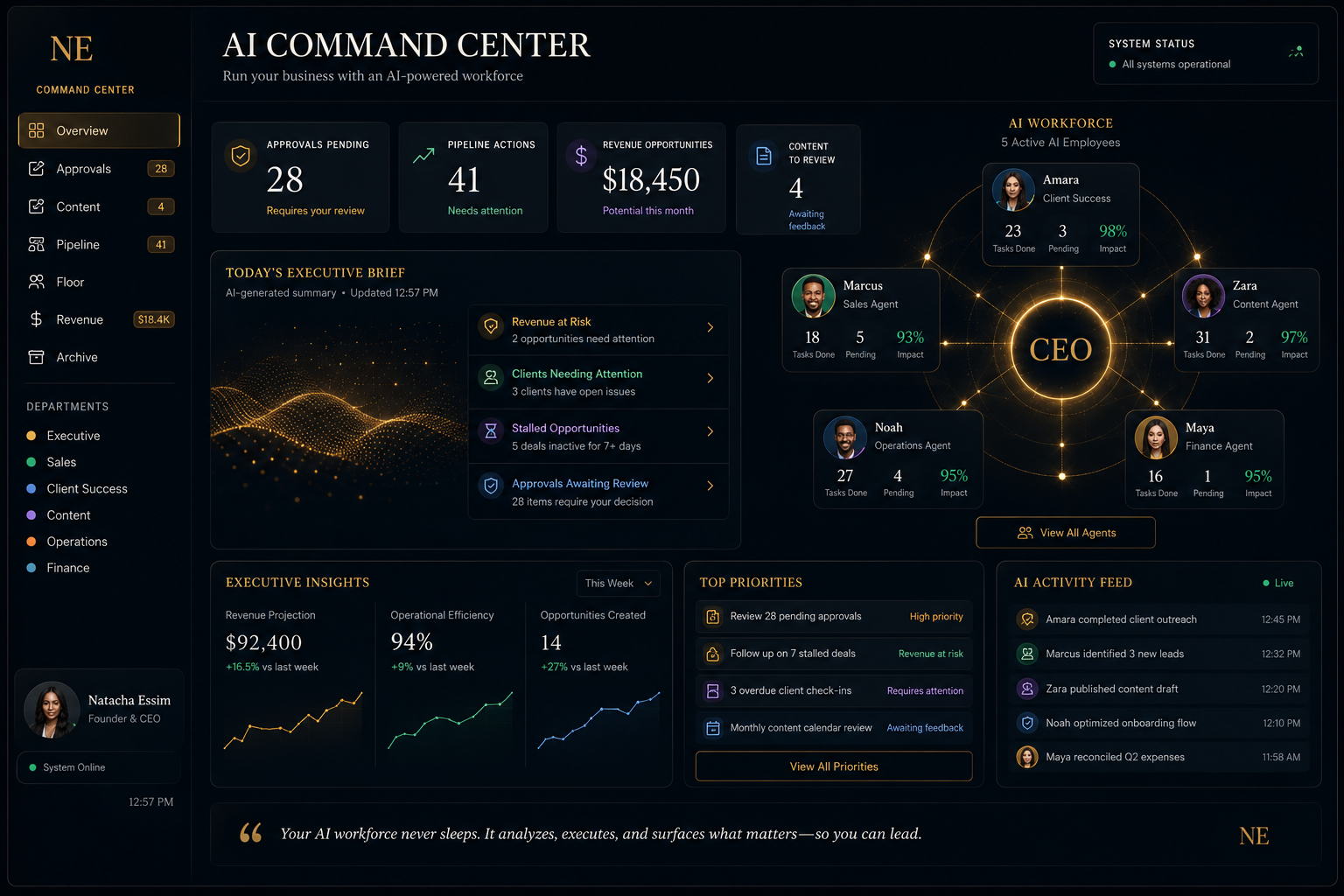
A centralized operational command layer designed to provide visibility across client operations, workforce operations, revenue operations, compliance governance, and hiring infrastructure.

Live in Production
The Problem

Running multiple AI agents across different workflows with no visibility into what's running, what's failing, or how resources are being consumed. Every breakdown required manual investigation.
Outcome
8+
AI agents orchestrated in real time across distinct workflows
Zero
Silent failures — every dropped task is logged, flagged, and queued for review
100%
Audit trail coverage on every AI action, schedule, and status change
Product
AI Command Center — Agent orchestration dashboard

AI Command Center — Real-time agent orchestration dashboard

Key Features
Real-Time Agent Status Board
Live view of all AI agents — running, idle, failed, or scheduled — with uptime metrics and last-activity timestamps.
Task Scheduler & Queue
Schedule recurring tasks, one-off jobs, and priority queues. Automatic retry on failure with configurable backoff.
Full Audit Trail
Every agent action, output, error, and status change is logged with timestamp, initiator, and context. Immutable record.
Failure Alerts & Notifications
Instant email alerts on agent failures, missed schedules, or quota thresholds. No more silent breakdowns.
Architecture

How It Was Built

Built on edge infrastructure for zero-latency status reads and distributed task queuing. Every agent action is written to an immutable audit log before the UI updates. Automated failure notifications keep the operator in the loop without manual monitoring.

Edge Runtime Edge Database Email Infrastructure Payment Processing Cron Triggers
Data Flow
Agent Workers
Task Queue
D1 Audit Log
Command Center UI
Failure Alerts
System 02 of 07
Healthcare Operations

Bel View
Operations Suite

Two connected systems for a home healthcare organization — a mobile caregiver notes portal and a role-isolated timekeeping platform that keeps payroll hours completely separated from PHI and client data.

Private Client Implementation

This system handles healthcare operations data. Client-specific details and operational figures have been omitted. System architecture, feature set, and workflow design are accurate.

The Problem

Caregiver notes were scattered across emails, personal devices, and Google Drive folders with no consistent structure or submission tracking. Timekeeping data was handled manually with no clean separation between what payroll needed and what contained sensitive caregiver and client information. Management had no real-time visibility into shift compliance or documentation status.

Outcome
Zero
PHI, PII, or client-sensitive data exposed to the accounting role
Live
Manager visibility into shift clock-in compliance and notes submission status
One
Centralized notes archive — organized by year and month, replacing scattered folders and email chains
Key Features
Mobile Caregiver Notes Portal
Accessible from any device. Caregivers log visit notes from the field after each shift. A direct button in the timekeeping system connects straight to the portal after clock-in.
Notes Submission Oversight
Manager dashboard shows which caregivers submitted notes after each shift and whether submissions were made within the required timeframe. Late or missing entries are flagged.
Shift Location Compliance
The timekeeping system captures whether each caregiver clocked in within the parameters of their assigned work site. Out-of-range clock-ins are visible to the manager for review.
Role-Isolated Access
Caregivers see their own records only. Managers see full shift and compliance data. Accountants access payroll hours exclusively — structurally blocked from PHI, PII, and all client data.
Payroll Hours Report
The system generates a clean work hours report from collected timekeeping data — formatted for direct upload into Bel View's timekeeping platform. No manual extraction required.
Organized Notes Archive
Notes are automatically archived by year and month — replacing scattered Google Drive folders, desktop files, and email attachments with a single searchable record.
Architecture

How It Was Built

Both systems are privately deployed with environment-isolated data. Access control is enforced at the API layer — the accountant's session is structurally incapable of returning PHI or client data, not just hidden in the UI. The notes portal is mobile-first to match how caregivers operate in the field. The timekeeping system connects directly to the notes portal via a post-clock-in action, reducing steps between shift start and documentation.

Mobile-Responsive Role-Based Access Serverless Functions Structured Database Location Verification Report Generation
Timekeeping + Notes Flow
Caregiver Clocks In
Location Verified
Notes Portal
Manager Dashboard
Payroll Report
System 03 of 07
Client Operations Infrastructure

Client
Agreement Hub

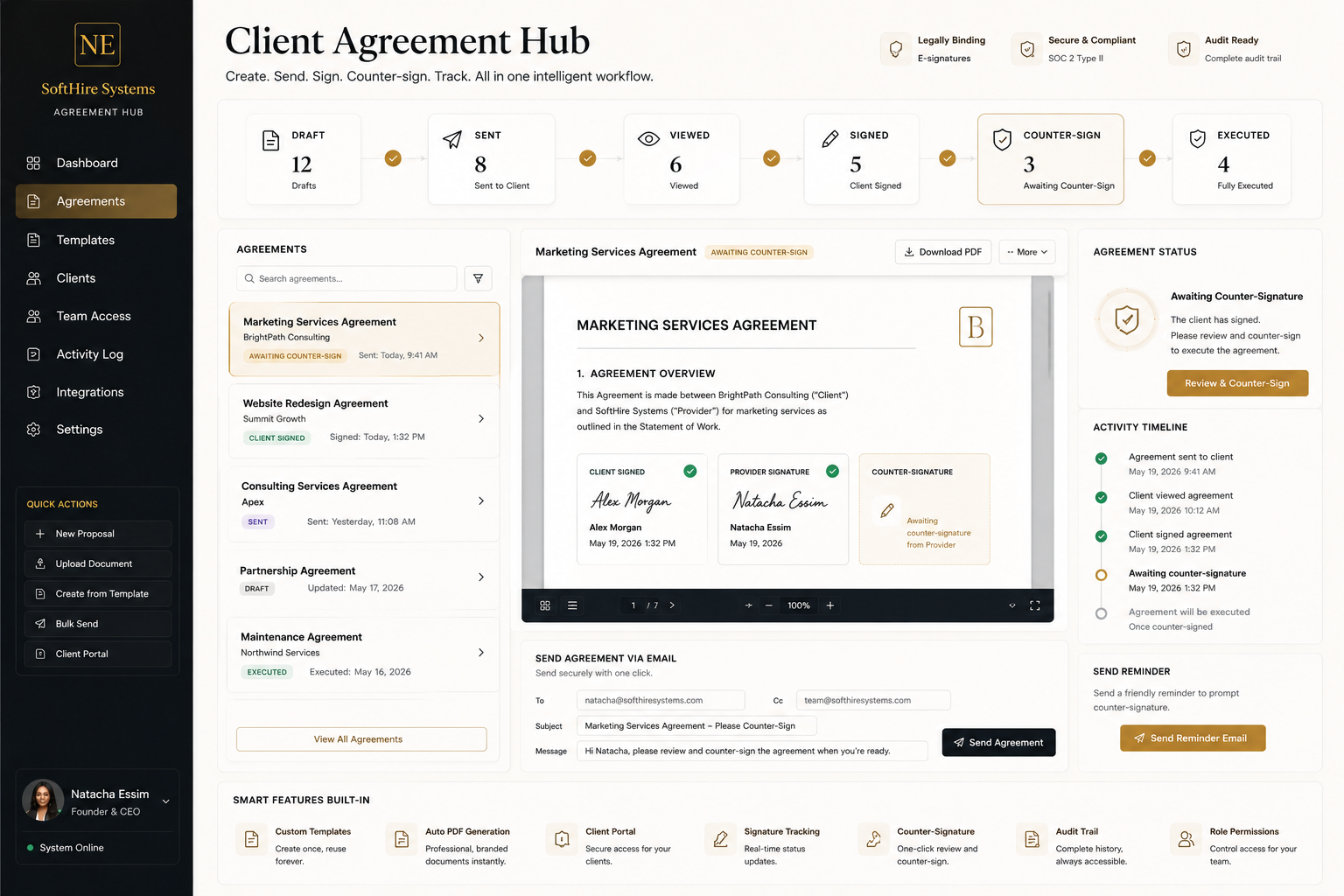
Designed to automate agreement creation, delivery, execution, countersignature workflows, and document management.

Live in Production
The Problem

Agreements sent as email attachments, signed offline, scanned and returned, then stored in Google Drive folders with no consistent naming convention. No visibility into who had signed, who hadn't, which version was active, or when anything happened.
Outcome
100%
Digital — every agreement created, signed, and stored in the system
Full
Audit trail on every agreement — view, sign, countersign, send events all logged
Auto
Automated client notifications and follow-up reminders for pending signatures
Product
Client Agreement Hub — Admin dashboard with agreement lifecycle tracking

Client Agreement Hub — Admin view with full agreement lifecycle tracking

Key Features
Agreement Creation & Templates
Admin creates agreements from templates. Custom fields populate client-specific terms. Version control built in.
Client E-Signature
Secure, tokenized signature link sent to client. Signature captured in browser, timestamped, and stored immutably.
Countersignature Workflow
After client signs, admin receives notification and countersigns within the system. Both parties receive final executed copy.
Automated Notifications
Agreement sent, viewed, signed, and executed events all trigger automated emails. Reminders for overdue signatures.
Architecture

How It Was Built

All agreement state transitions run server-side through a custom API layer. Each agreement generates a secure, time-limited signing token — clients access their signing page through a unique URL that expires after use. Every state change writes an immutable audit record before responding to the client.

Serverless Functions Structured Database Email Infrastructure Signed Tokens Payment Processing
Signature Flow
Admin Creates Agreement
Secure Link
Client Signs
Admin Countersigns
Audit Record
System 04 of 07
Client Communications Infrastructure

Communications
Hub

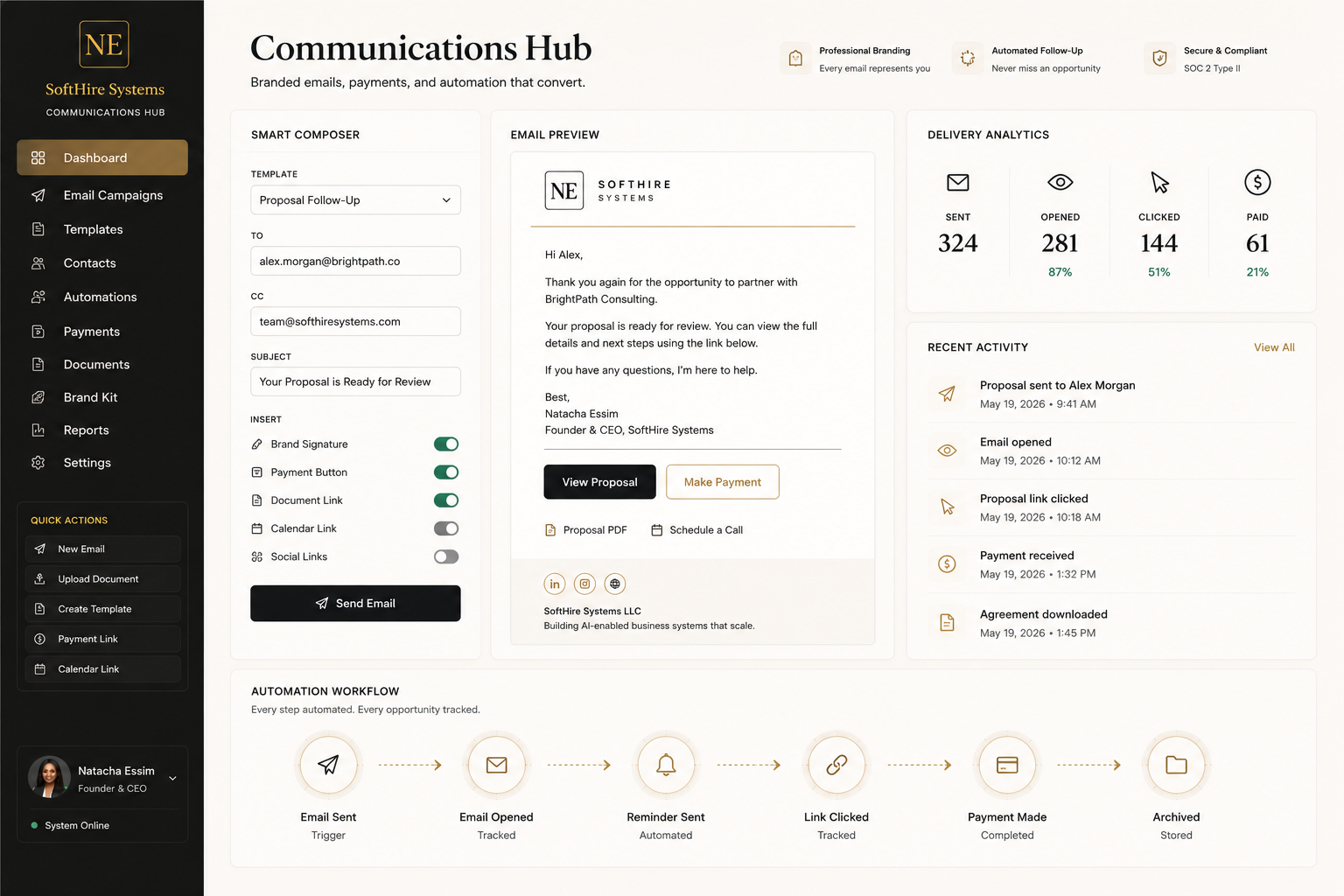
A centralized communication environment designed to improve visibility across client interactions.

Live in Production
The Problem

Sending personalized outreach, onboarding sequences, and client updates manually — one by one — from a personal inbox. No templates, no tracking, no record of what was sent to whom or when. Follow-up was guesswork.
Outcome
One
Centralized portal for all outbound business communications
100%
Delivery tracking and send history — every email logged with recipient and timestamp
0
Manual copy-paste sends — templates handle personalization at the field level
Product
Communications Hub — Template-driven email operations portal

Communications Hub — Template-driven email operations portal

Key Features
Template Library
Create and save email templates with dynamic fields. Personalization tokens populate at send time — name, company, context.
Recipient List Management
Manage contact lists by segment. Filter by role, status, or tag. Send to individual or group with one action.
Delivery Tracking & Send Log
Every send is logged with template used, recipient, timestamp, and delivery status. Full searchable history.
Preview Before Send
Rendered preview with live field substitution before any email is dispatched. Eliminates broken template sends.
Architecture

How It Was Built

Admin portal backed by serverless functions for all send operations. Email delivery fires real-time status webhooks so every send record updates as messages reach their destination. Full send history is queryable by recipient, campaign, and delivery status — no manual tracking required.

Serverless Functions Email Infrastructure Structured Database Event Webhooks
Send Pipeline
Admin Portal
Template Engine
Email API
Delivery Event
Audit Log
System 05 of 07
Analytics & Intelligence

Subscriber
Intelligence Platform

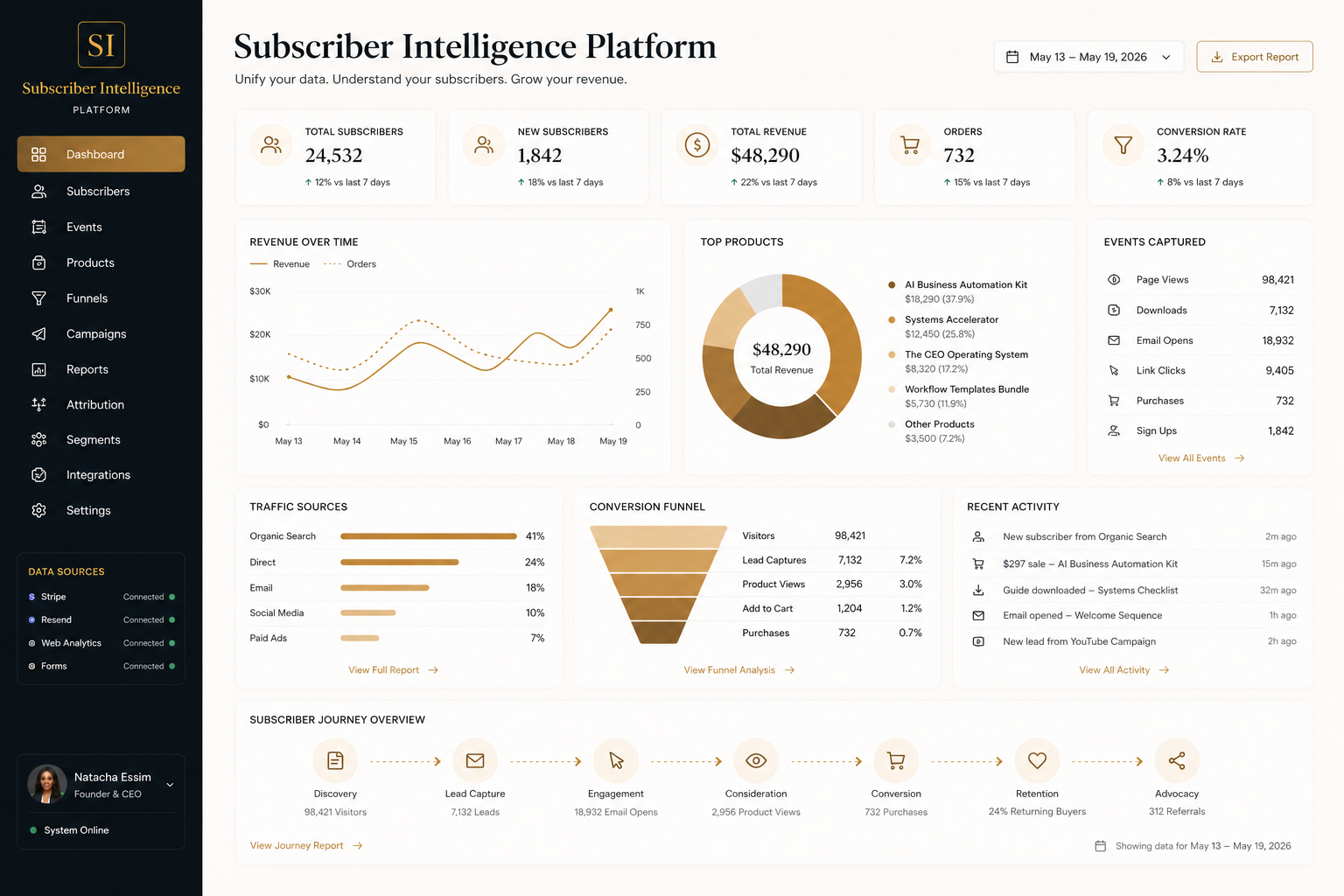
A custom analytics system that turns a raw subscriber list into an operational intelligence layer — showing who bought what, where they came from, and which content drives consulting revenue.

Live in Production
The Problem

Building an audience without knowing who was buying, where subscribers came from, or which resources correlated with consulting inquiries. Email provider dashboards showed opens and clicks — nothing about revenue, purchase behavior, or lead quality.
Outcome
Full
Subscriber profiles with purchase history, lead source, and engagement signal
10x
More revenue attribution data than any standard email platform provides
Real
Time visibility into which downloads, products, and channels drive consulting leads
Product
Subscriber Intelligence Platform — Analytics dashboard

Subscriber Intelligence Platform — Revenue and subscriber analytics

Key Features
Subscriber Profile Intelligence
Each subscriber record includes lead source, download history, purchases, and consulting inquiry status — all in one profile.
Revenue Attribution
Every purchase tied back to the subscriber who made it, with source, product, and date. No more blind revenue reporting.
Lead Source Tracking
UTM-level attribution on every subscriber. See which channels (LinkedIn, newsletter, referral, organic) produce buyers vs. lurkers.
Consulting Lead Identification
Flags subscribers who've downloaded multiple resources and made purchases as high-intent consulting prospects for follow-up.
Architecture

How It Was Built

Built on edge infrastructure for sub-50ms dashboard load times. Behavioral events from payment, download, and email activity are normalized into a single subscriber timeline — no intermediate analytics platform required. The dashboard queries a purpose-built event database directly, producing unified profiles that no off-the-shelf tool generates.

Edge Runtime Edge Database Payment Events Attribution Tracking Event Webhooks
Intelligence Pipeline
Payment Events
Download Events
Email Events
Ingestion Worker
Edge Database
Analytics Dashboard
Founder Product
Cross-Border Hiring Infrastructure

SoftHire Systems

A cross-border hiring infrastructure platform that generates compliant offer letters, employment agreements, welcome letters, signing workflows, compliance guidance, and payroll-ready handoff packages across multiple jurisdictions — powered by one intelligent questionnaire.
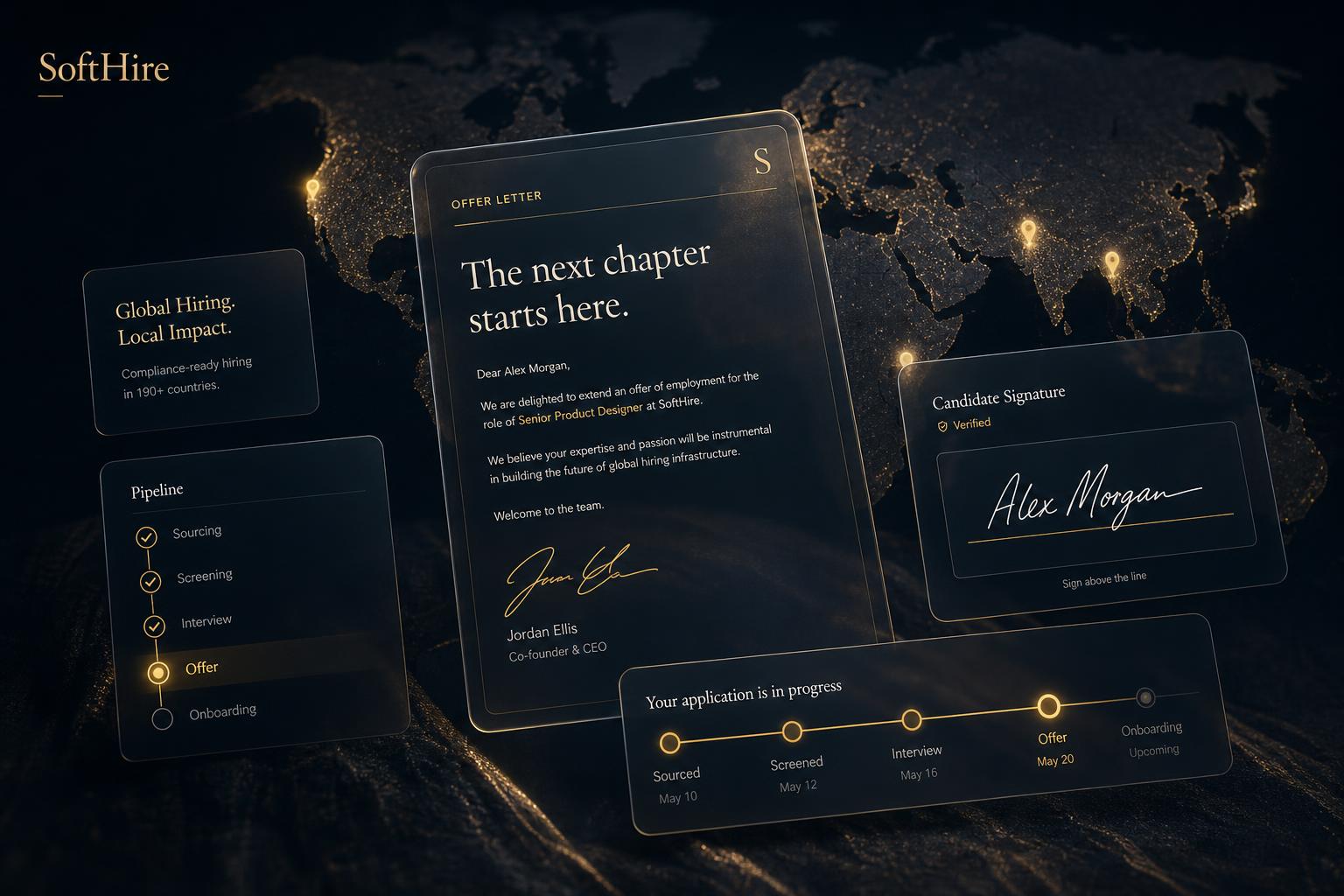
Live in Production
SoftHire Systems — cross-border hiring infrastructure platform

SoftHire Systems — Hiring infrastructure for cross-border employers

What SoftHire Is

SoftHire is infrastructure, not advice. It transforms what is traditionally a fragmented legal and administrative process — researching labor laws, finding contract templates, drafting documents, managing signatures, tracking compliance, preparing payroll onboarding — into a structured, automated workflow. Information is entered once and flows through the entire hiring lifecycle automatically.

The Problem

Most employers hiring internationally must research labor laws, find contract templates, draft offer letters, draft employment agreements, manage signatures, track compliance obligations, and prepare payroll onboarding — each step manually, each jurisdiction introducing different rules, deadlines, document requirements, statutory registrations, and compliance obligations. The process is repetitive, expensive, and entirely manual.

Built For
Founders & CEOs
Hiring internationally without a legal or HR team to manage the paperwork.
HR Leaders
Managing multi-country hiring operations across jurisdictions with different compliance requirements.
HR Consultants
Supporting global clients who need jurisdiction-compliant hiring documentation at scale.
Diaspora Entrepreneurs
Building teams in Africa while operating abroad — navigating two legal systems simultaneously.
Small & Mid-Sized Businesses
Hiring across borders without the infrastructure of a large enterprise HR department.
Staffing Agencies & PEOs
Operating across multiple jurisdictions and managing high-volume cross-border placements.
The Workflow

One Questionnaire. Every Document.

Information is entered once. The platform generates and routes every downstream document, signature, and compliance deliverable automatically.
SoftHire Hiring Infrastructure Flow
One Questionnaire
Offer Letter Generation
Employment Agreement
Jurisdiction Logic & Compliance Rules
Employer Signature
Candidate Signature
Welcome Letter
Compliance Dashboard
Payroll / HRIS Handoff
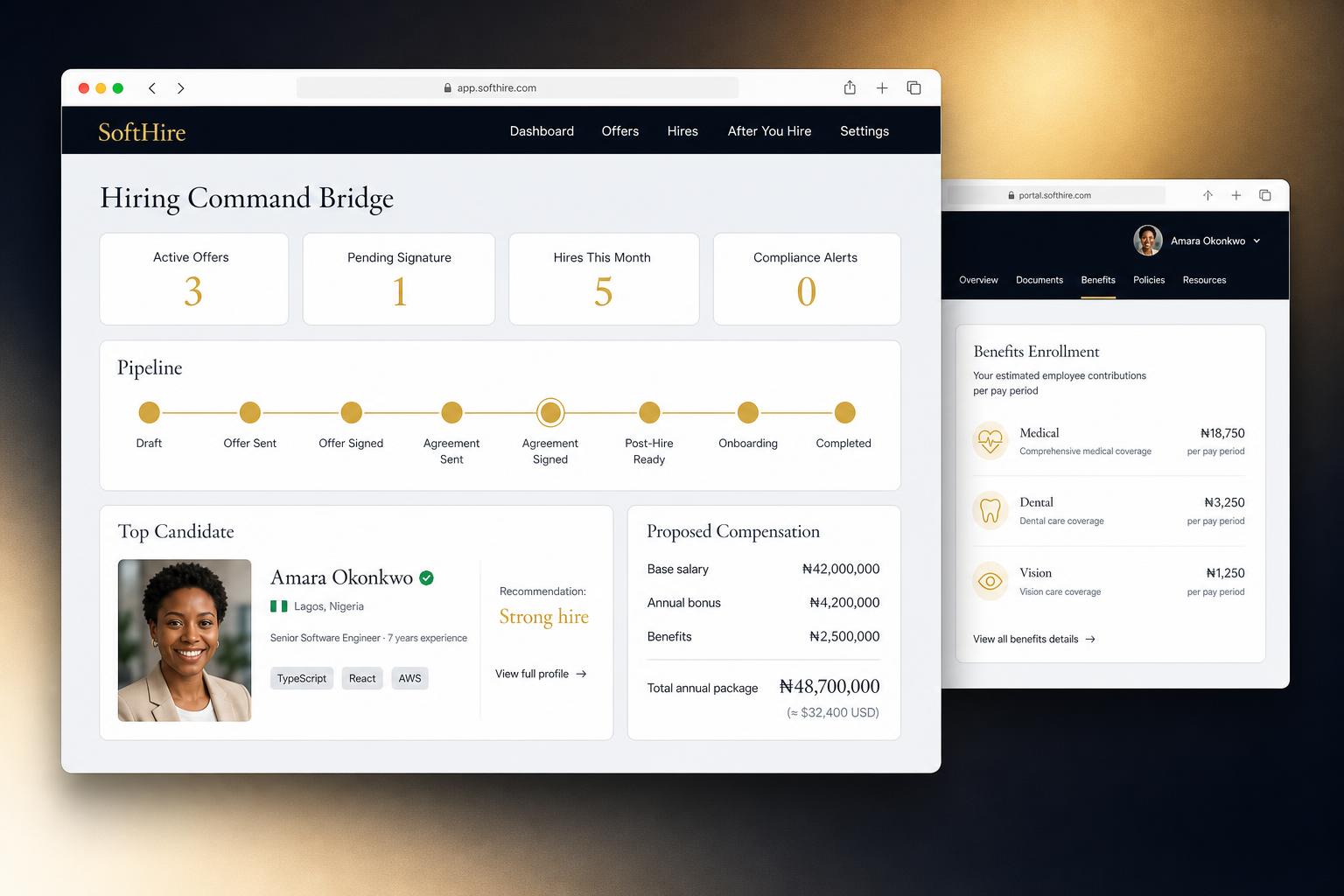
Platform
SoftHire Systems — hiring workflow platform interface

SoftHire Systems — hiring workflow from document generation through signing and payroll handoff

Key Differentiators
One Unified Questionnaire
Employers enter information once. The platform populates all downstream documents and workflows automatically — no re-entry across stages.
Jurisdiction Intelligence
Document logic, employment types, statutory references, probation rules, compliance requirements, and currency adapt automatically by jurisdiction.
Compliant Document Generation
Generates offer letters and employment agreements with jurisdiction-specific language and statutory references — not generic templates.
Bilingual Cameroon Contracts
Supports bilingual English/French employment documentation for Cameroon hires — a requirement no generic platform addresses.
Integrated Signing Pipeline
Automates employer signature, candidate signature, agreement delivery, welcome letters, and status tracking — no third-party signing tool required.
Compliance Dashboard
Surfaces post-hire compliance obligations and deadlines by jurisdiction so nothing falls through the cracks after signing.
Payroll & HRIS Handoff
Packages completed documentation and structured data for payroll or HRIS implementation — the final mile that most hiring workflows skip entirely.
Supported Jurisdictions

Hiring Infrastructure Available In

United States Cameroon Nigeria Kenya Ghana South Africa
Architecture

How It Was Built

Multi-tenant architecture with fully isolated client workspaces. Jurisdiction-aware document generation runs server-side — producing compliant agreements without relying on third-party signing services. Subscription billing is handled end-to-end within the platform. The compliance record layer is configurable per client without code changes.

Serverless Functions Payment Processing Structured Database Email Infrastructure Multi-Tenant E-Signature
Evolution Suite

SoftHire is being extended into a full hiring infrastructure ecosystem. Current and upcoming modules:

Hiring Infrastructure Available Now
Offer letters, employment agreements, signing pipeline, compliance dashboard, and payroll handoff — live across six jurisdictions.
Handbook Architect Coming Soon
Generate jurisdiction-specific employee handbooks automatically from hire data already in the system.
Orientation Vault Coming Soon
Deliver role-specific onboarding content and orientation videos to new hires through a structured, trackable portal.
Integration Hub Coming Soon
Connect payroll, HRIS, accounting, and benefits systems directly — eliminating manual data handoff.
Integrity Tracker Coming Soon
Monitor probation periods, contract renewals, and document expirations — surfacing critical deadlines before they become compliance failures.
Policy Stream Coming Soon
Monitor labor law changes across supported jurisdictions and identify which active hires are affected by regulatory updates.
Interactive Demo

Explore SoftHire In Action

Walk through six hiring scenarios across multiple jurisdictions and experience the complete hiring workflow from document generation through signing and compliance preparation.

Launch Interactive Demo
System 07 of 07
Event Operations Infrastructure

PKME
Event Platform

A centralized event operations environment for inventory, bookings, rentals, deposits, consultation requests, and customer management.

Live in Production
The Problem

An event decor and rental company managing bookings through phone calls, DMs, and a shared calendar that didn't talk to inventory. Double-bookings happened. Customers didn't know what was available on their date. Delivery pricing was calculated manually per order, with errors.

Outcome
0
Double-bookings — inventory calendar prevents conflicts at the item level
Auto
Delivery pricing calculated from customer address to event location at checkout
24/7
Self-serve booking — customers browse, check availability, and submit inquiries without calling
Product
PKME Event Platform — Decor portal and booking system

PKME Event Platform — Page-flip decor portfolio with inventory-linked rental cart

Key Features
Page-Flip Portfolio
Interactive portfolio that showcases decor collections in a magazine-style page-flip format. Items link directly to the rental cart.
Inventory-Linked Availability Calendar
Customers select their event date and see only items that are available. Booked items are blocked automatically — no manual calendar updates.
Mileage-Based Delivery Pricing
Delivery fee calculated from the business address to the event location at checkout. Customer enters their address; the system prices the delivery automatically.
Decor Design Planning Service
Customers select their event style, color palette, and vision. Submission triggers a design consultation with the owner. Builds toward a custom quote.
Architecture

How It Was Built

Lightweight frontend with serverless functions handling all dynamic operations. Inventory and booking records are managed through a structured database that gives the business owner a no-code interface — no custom admin needed. Mileage to the delivery address is calculated at checkout in real time.

Serverless Functions Structured Database Geolocation API Payment Processing
Booking Flow
Portfolio Browser
Design Planner
Rental Cart
Availability Check
Mileage Calc
Booking Record
Work Together

Ready to build a system
that actually runs itself?

If you have a process that's costing you time, people, or compliance risk — let's look at whether a system can solve it.

Connect